Over the last few days I've had a few minutes here-and-there to work on the Public Library and I have to say, I'm really happy with how it's going.
In total I've probably spent an hour to an hour and a half working on it, and it's already at a point where it can do the essentials: publish a book, checkout a book and list the books in the Library.
I started writing this using the same pattern as the Pouch tools with deliberate attention to creating a HNSI. As a result I was able to quickly iterate through implementing the essential functions and shoring-up the interface before getting the complication of networking involved. Once I had something that worked in a local terminal, I was able to add network support and focus on that specific task knowing that the primary functionality was solid.
I'm really happy with the simplicity of the tools I've written this way so I had some apprehension about getting networking involved. I've written countless network services before but they were almost always built with the networking implementation first and often built on top of networking-specific libraries, frameworks, etc. In this case networking came after implementing and testing the actual functionality and I was worried that adding network code would make a mess of things.
So I took an approach that simply replaced the existing input/output functions I was using to communicate with the local terminal (print() and input()) with network-aware alternatives (net_print() and net_input()). I wrote these functions in a separate program so I could work out the kinks before bringing them into the working Public Library code.

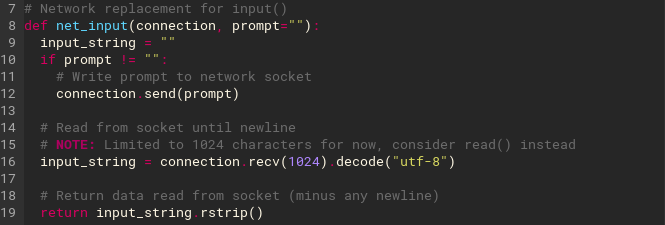
From there it was a simple matter of replacing print() with net_print() and input() with net_input() anywhere I wanted the I/O to go to the network (essentially anywhere other than local debugging output).
As a result I was able to quickly turn a local console tool into a network tool.
At this point the PL works over the network and I can access it from a regular computer using a telnet client. The next step will be to get the //e connected to the network and try interacting with the Public Library using the SwyftCard's SEND command. I've ordered yet another serial cable for this so with any luck it will be the right one and maybe I'll have time this weekend to give that a shot.
Jason J. Gullickson, 2026